
You can easily download it from your dashboard by following these steps:
1. Log in to your dashboard here.
2. Go to the section Your tests at the top.

3. Select the test you want to download the report of and press the "View test details" button on the right hand side.

4. On the right hand side you will see a button Download your report (.pdf)

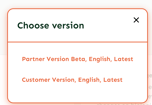
5. Choose version: Partner Version Beta, English, Latest
1. Log in to your dashboard here.
2. Go to the section Your tests at the top.
3. Select the test you want to download the report of and press the "View test details" button on the right hand side.
4. On the right hand side you will see a button Download your report (.pdf)
5. Choose version: Partner Version Beta, English, Latest